
Source-aware views
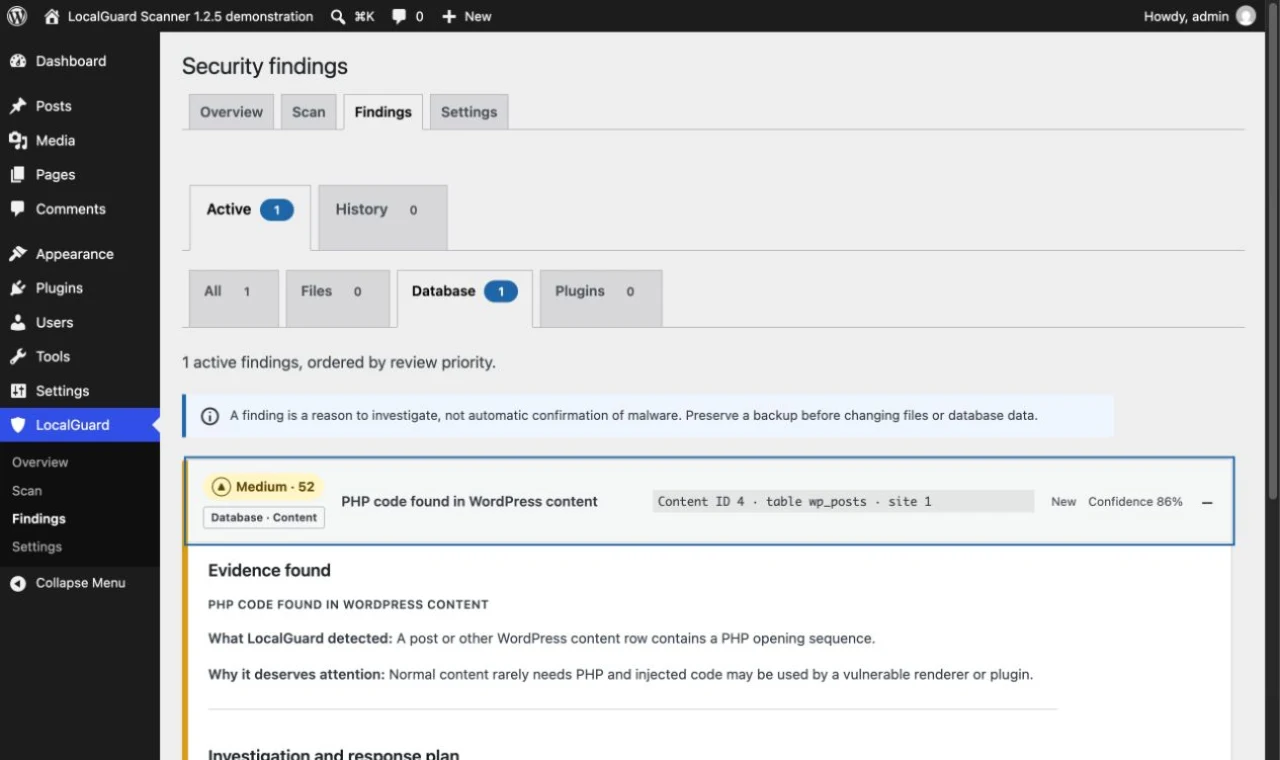
Move between Files, Database and Plugins without mixing fundamentally different evidence.
Protect
A privacy-first WordPress scanner that keeps scan data on your server and explains what deserves investigation.
A suspicious file or an unfamiliar administrator account deserves attention, but an automated result is not proof of malware. Site owners need evidence they can review without giving a scanner permission to delete content automatically.
LocalGuard inventories files and supported database areas, checks WordPress core against bundled SHA-256 manifests and combines signed offline rules with contextual heuristics. Scan data remains on the WordPress server.
New in version 1.2.5
Findings now separate file, database and plugin evidence, then turn technical references into a safer review path.
Move between Files, Database and Plugins without mixing fundamentally different evidence.
Database references identify the content, option, table and site instead of resembling server folders.
Relevant database findings can include a query for inspecting the affected row without modifying it.
Each expanded result separates evidence, safe checks, possible correction and cleanup verification.
A privacy-first, report-only malware scanner for WordPress.
No files or database content leave the server during a scan, and the plugin sends no telemetry.
Manual and daily WP-Cron scans run in short slices, remember progress and respect time and memory budgets.
Source tabs, scan coverage and finding history keep files, database records and plugin evidence understandable.
Signed offline rules and core catalogs distinguish evidence that needs action from harmless patterns such as inert upload placeholders.
Upload and activate the plugin ZIP, then review its local diagnostics.
Start a manual scan or configure a daily one; the work continues in resumable batches.
Check the stated evidence, coverage and safe next steps before changing any site data.
In development
Review the requirements and limitations above before installing this development release.
Download localguard-scanner-1.2.6.zip